Businesses are no longer running all their IT infrastructure from one central data center. A factory may need computing power on the production floor. A hospital may need local systems to support critical applications. A bank may need infrastructure at multiple locations. An organization working with AI or IoT may also need computing resources closer to where data is generated.
In these situations, a micro data center can be a practical option.
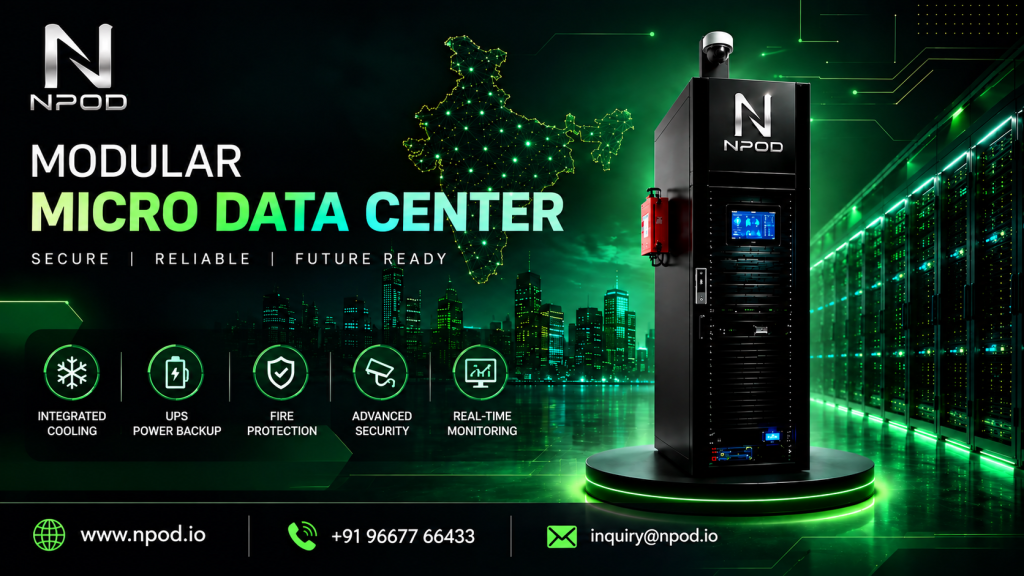
Instead of setting up a complete traditional data center, businesses can use a compact infrastructure solution that brings together servers, racks, cooling, power backup, security, fire protection, and monitoring.
But selecting the right system requires more than comparing rack sizes or prices. The configuration should match your workload, location, power requirements, environmental conditions, security needs, and plans for future expansion.
Here are the main factors to consider before choosing a micro data center.
1. Understand Your IT Requirements First
Before speaking with vendors, make a list of the equipment you expect to install.
This could include:
- Servers
- Storage systems
- Network switches
- Firewalls
- CCTV equipment
- Industrial systems
- GPU servers
- IoT equipment
- Backup appliances
The type of equipment makes a significant difference to the infrastructure you need.
For instance, a rack containing conventional business servers will have different power and cooling requirements from one containing high-performance GPUs.
You should also consider how much equipment you expect to add over the next few years. This will help you avoid selecting a system that becomes too small soon after installation.
2. Select the Right Rack Capacity
Rack space is usually measured in rack units, or U.
A server might occupy 1U or 2U, while other equipment can require different amounts of space. Add up the equipment you currently have and leave some room for future additions.
For example, if your current equipment requires around 18U, selecting a system with only 20U of usable space may leave little room for expansion.
NPOD provides different rack configurations, including 24U, 32U, and 42U options, allowing organizations to select a configuration according to their infrastructure requirements.
The important thing is not to choose the largest rack available. Choose a capacity that makes sense for your present workload while leaving reasonable room for growth.
3. Pay Close Attention to Cooling
Cooling is one of the most important parts of any IT infrastructure.
Servers, storage systems, networking equipment, and GPUs generate heat while operating. If that heat is not removed effectively, equipment can operate outside its recommended temperature range.
When evaluating a micro data center, ask the vendor:
- What cooling capacity is available?
- What type of cooling system is used?
- How is airflow managed?
- Is temperature monitored continuously?
- Can the system support high-density equipment?
- What happens if the cooling system develops a fault?
The answer becomes particularly important for AI and GPU deployments, where equipment can generate considerably more heat than conventional servers.
NPOD incorporates integrated precision cooling into its micro data center solutions, reducing the need to design the cooling infrastructure separately.
4. Check the Power and UPS Configuration
Reliable power is essential for business applications.
A power interruption can shut down servers, interrupt applications, and potentially affect ongoing operations. A UPS provides backup power and helps protect IT equipment from certain power-related issues.
When comparing systems, look at:
- UPS capacity
- Backup duration
- UPS architecture
- Power distribution
- Surge protection
- Power monitoring
- Battery configuration
- Expansion options
Don’t select UPS capacity based on the number of servers alone. The calculation should include the complete IT load and the amount of backup time required by your business.
NPOD integrates UPS and power management within its micro data center architecture, with online UPS and intelligent power monitoring options.
5. Check the Fire Protection System
Fire protection should be part of your infrastructure planning from the beginning.
Traditional building fire systems may not provide the protection required for sensitive IT equipment. A dedicated solution can combine fire detection and suppression with the rest of the data center infrastructure.
Ask the vendor:
- How is smoke detected?
- Is heat detection included?
- What suppression method is used?
- Does the system generate alerts?
- Can it operate automatically?
- How is the system maintained?
NPOD includes fire detection and clean-agent suppression as part of its integrated micro data center setup.
The appropriate system will depend on the facility, equipment, local regulations, and safety requirements.
6. Consider Remote Monitoring
A micro data center may be installed somewhere that doesn’t have an IT team on site.
This is common in manufacturing facilities, branch offices, telecom locations, and remote operational sites.
In such cases, remote monitoring can make day-to-day management much easier.
Depending on the solution, you may want visibility into:
- Temperature
- Humidity
- UPS status
- Power consumption
- Cooling
- Door access
- Fire alerts
- Environmental conditions
Remote alerts can also help the IT team respond to problems without waiting for someone at the location to notice them.
NPOD provides monitoring capabilities for environmental conditions, power, access, and other infrastructure parameters.
7. Don’t Overlook Physical Security
Your IT infrastructure needs protection from unauthorized physical access as well as network-based threats.
This becomes particularly important when the equipment is installed outside a dedicated data center.
Depending on the location, you may need:
- Biometric authentication
- PIN or RFID access
- CCTV
- Door sensors
- Access logs
- Security alerts
For example, a factory may have dozens of employees working around the IT infrastructure every day. A branch office may have only a few employees but no dedicated IT staff.
The security setup should reflect the actual environment.
NPOD incorporates physical access control and CCTV capabilities into its micro data center solutions.
8. Think About the Installation Location
A micro data center inside an air-conditioned office has very different environmental requirements from one installed on a factory floor.
Before selecting a system, consider:
- Temperature
- Dust
- Humidity
- Water exposure
- Available floor space
- Electrical supply
- Network connectivity
- Physical access
- Indoor or outdoor installation
If the environment is exposed to dust or moisture, enclosure protection becomes especially important.
NPOD offers IP55-rated enclosure options for deployments where protection against dust and water ingress is required.
The enclosure specification should always be matched to the actual installation environment rather than selected simply because it appears on a product datasheet.
9. Find Out How the System Is Delivered
A traditional server room can involve several different contractors.
One company may handle electrical work, another cooling, another fire protection, and another security. Coordinating all of them can increase the complexity of a project.
A modular micro data center brings several of these components together into a pre-engineered system.
This can simplify installation, particularly when a company needs IT infrastructure at a new factory, branch, remote location, or edge site.
When speaking with a supplier, ask:
Which components are already integrated and tested before delivery?
Also ask what work needs to be completed at your site before installation.
10. Consider Future Expansion
Your IT requirements are unlikely to remain unchanged.
Data volumes increase. New applications are deployed. Additional users come on board. Companies may introduce AI, analytics, IoT, or other workloads.
Therefore, consider whether the micro data center can accommodate future requirements.
Look at:
- Additional rack space
- Higher power requirements
- Additional cooling capacity
- UPS expansion
- Network expansion
- Monitoring capabilities
- Additional security requirements
A solution that can be expanded without replacing the entire infrastructure can be more practical over the long term.
11. Compare the Complete Cost
Price is important, but the purchase price alone doesn’t tell you what the infrastructure will cost.
When comparing vendors, find out what is included in the quotation.
Consider:
Equipment + Installation + Power + Cooling + Monitoring + Maintenance + Support + Future Expansion
Ask about:
- Installation charges
- Warranty
- Annual maintenance
- Battery replacement
- Cooling maintenance
- Software or monitoring fees
- Spare parts
- On-site support
- Upgrade costs
This gives you a clearer picture of the investment required over the life of the system.
12. Questions to Ask Before Buying
Before making a final decision, ask your shortlisted vendors these questions:
- What rack capacity is suitable for my current equipment?
- How much room is available for expansion?
- What cooling capacity does the system provide?
- What UPS configuration is recommended for my load?
- How long will the backup power last?
- What fire detection and suppression system is included?
- What physical security features are available?
- What can be monitored remotely?
- Is the enclosure suitable for my installation environment?
- What maintenance and support are provided after installation?
The answers will help you compare different solutions on more than just price.
Which Micro Data Center Should You Choose?
There is no single configuration that works for every business.
A small branch office may need a compact system with basic monitoring and security.
A manufacturing facility may require greater environmental protection, power backup, and physical security.
An AI or GPU deployment may need higher power density and a stronger cooling system.
A healthcare or financial organization may place greater emphasis on availability, security, monitoring, and controlled access.
Your decision should therefore begin with your workload and operating environment.
Once you understand those requirements, you can determine the appropriate rack capacity, cooling, power, protection, security, and monitoring capabilities.
Conclusion
Choosing a micro data center is an infrastructure decision that can affect your IT operations for years.
Instead of looking only at the number of rack units or the initial price, consider the complete environment around your IT equipment.
Ask whether the solution can provide the power, cooling, protection, security, monitoring, and flexibility your business requires.
NPOD combines these infrastructure components into a modular micro data center solution for applications such as edge computing, manufacturing, healthcare, banking, AI/ML, and remote or branch locations.
If you’re planning a new server room or deploying IT infrastructure at a factory, branch, remote site, or edge location, start by documenting your equipment, power requirements, cooling load, security needs, installation environment, and expected growth.
Once those requirements are clear, you can have a much more productive conversation with a micro data center provider—and choose a configuration that fits your business rather than simply choosing the lowest-priced option.
Frequently Asked Questions
1. What is a micro data center?
A micro data center is a compact, integrated IT infrastructure solution that combines components such as server racks, power backup, cooling, monitoring, security, and fire protection in a single system or enclosure. It is commonly used in branch offices, factories, healthcare facilities, remote locations, and edge computing environments.
2. How much does a micro data center cost?
The cost depends on factors such as rack capacity, IT load, UPS capacity, cooling requirements, fire protection, security, monitoring, installation, and the deployment environment. A customized configuration is usually required to determine the actual cost for a business.
3. What should I consider when choosing a micro data center?
Consider your current and future IT equipment, rack space, power consumption, cooling requirements, installation location, environmental conditions, physical security, fire protection, remote monitoring, scalability, and maintenance requirements. The right configuration should be based on your workload rather than price alone.
4. How much rack space do I need for a micro data center?
The required rack space depends on the number and size of your servers, storage systems, networking equipment, and other IT devices. You should also allow some additional capacity for future expansion. There is no standard rack size that suits every business.
5. What cooling is required for a micro data center?
Cooling requirements depend mainly on the IT load and rack density. Conventional servers may require standard precision air cooling, while high-density or GPU-based workloads can require significantly greater cooling capacity. The cooling system should be sized according to the actual heat generated by the IT equipment.
6. Can a micro data center support AI and GPU workloads?
Yes. A micro data center can support AI inference, GPU computing, video analytics, and other high-performance workloads when the system is designed for the required power and cooling capacity. GPU deployments should be evaluated carefully because their power and thermal requirements can be considerably higher than conventional servers.
7. Can a micro data center be installed in a factory or remote location?
Yes. Micro data centers are commonly considered for factories, branch offices, warehouses, telecom sites, healthcare facilities, and remote locations. For industrial or exposed environments, factors such as dust, humidity, temperature, physical security, enclosure protection, power availability, and remote monitoring should be evaluated before deployment.
8. What is the difference between a micro data center and a traditional data center?
A traditional data center is generally a dedicated facility with separate systems for power, cooling, security, fire protection, and IT infrastructure. A micro data center is a smaller, integrated solution that combines many of these components into a compact system. It is useful when an organization needs localized IT infrastructure without building a full-scale data center facility.