In this article
Imagine a 300-bed hospital with an ICU, emergency department, radiology unit, laboratory, pharmacy, and several connected medical devices. Every department depends on technology, and much of that technology needs to remain available 24/7.
Doctors need quick access to patient records. Radiologists work with large medical imaging files. Monitoring devices continuously generate information. Hospital staff depend on applications for admissions, billing, laboratory reports, pharmacy management, and communication.
Now imagine the hospital’s server room starts overheating, a power problem affects critical equipment, or the infrastructure becomes difficult to expand.
For the IT team, this isn’t simply a technical inconvenience. It can affect the systems that hospital staff rely on to perform their jobs.
This is one reason micro data center for hospitals are becoming an option worth considering when healthcare organizations modernize their IT infrastructure.
The Growing IT Challenge Inside Hospitals
Healthcare has become increasingly digital, but the infrastructure supporting that digital transformation doesn’t always grow at the same pace.
A hospital can start with a relatively small server room. Over time, more applications, servers, storage systems, networking equipment, security systems, and connected devices are added.
The result?
More equipment generates more heat. Power requirements increase. Space becomes limited. Cooling becomes harder to manage. Physical access needs greater control, and the IT team has more systems to monitor.
Eventually, simply adding another server may no longer be the real solution.
The hospital needs to think about the environment in which its IT equipment operates.
What Is a Micro Data Center?
A micro data center is a compact, purpose-built environment for housing IT equipment.
Instead of setting up servers in an ordinary room and managing cooling, power backup, security, and monitoring separately, a micro data center can bring these requirements together in a controlled setup.
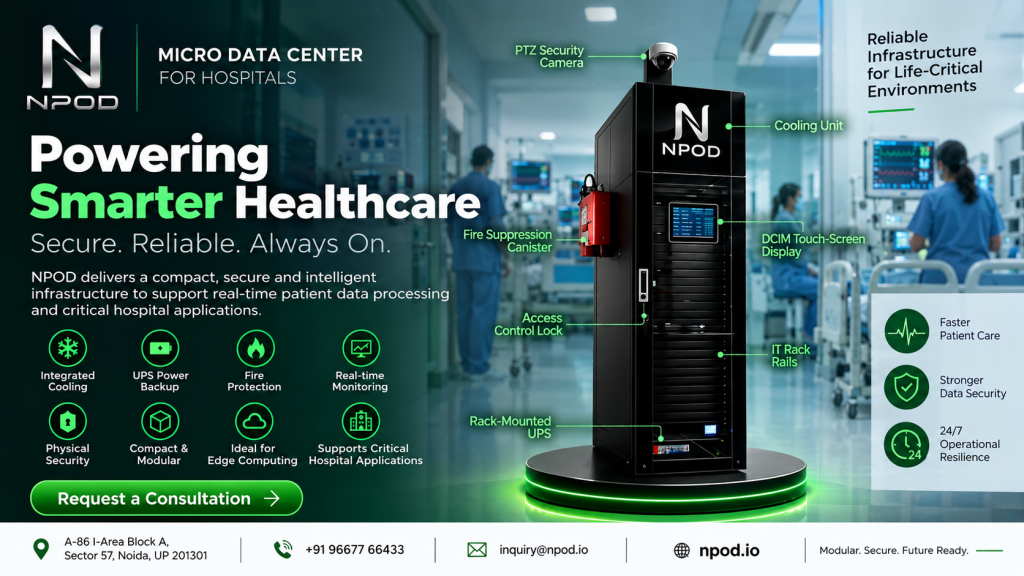
Depending on the configuration, it can include:
- Server and networking racks
- UPS power backup
- Dedicated cooling
- Fire protection
- Environmental monitoring
- Physical access control
- CCTV and security
- Remote infrastructure monitoring
For a hospital, this creates a dedicated environment for IT equipment without requiring the organization to build a large conventional data center.
Why Does Real-Time Data Processing Matter in Healthcare?
A hospital generates data continuously.
Patient monitoring systems, medical devices, laboratory equipment, diagnostic machines, electronic health records, and other applications all contribute to this flow of information.
The challenge isn’t just storing that data. In many situations, applications need to access or process information quickly.
For example, a connected monitoring system may need to communicate with a local application without depending entirely on a distant infrastructure location.
This is where real-time patient data processing becomes relevant.
A hospital can place appropriate computing resources closer to the devices and applications that need them while still using centralized data centers or cloud platforms for storage, backup, analytics, and other workloads.
Where Edge Computing Fits Into a Hospital
Think about a hospital with hundreds of connected devices spread across different departments.
If every piece of information has to travel to a distant location before it can be processed, the hospital becomes heavily dependent on network connectivity and centralized infrastructure.
With edge computing in healthcare, selected workloads can be processed closer to where the data is generated.
A simplified architecture could look like this:
Medical Devices → Local Processing → Hospital Applications → Central Data Center / Cloud
This doesn’t mean hospitals need to choose between edge computing and cloud computing.
They can work together.
Local infrastructure can handle workloads that benefit from proximity and quick access, while centralized or cloud infrastructure can handle long-term storage, backup, enterprise applications, analytics, and other requirements.
A Practical Example: Medical Imaging
Consider the radiology department.
CT scans, MRI scans, X-rays, and other diagnostic systems can generate large amounts of data. Radiologists and other healthcare professionals may need to access this information as part of their workflows.
A hospital can use local computing infrastructure to support selected imaging-related workloads closer to the diagnostic environment.
The central data center or cloud can continue to handle longer-term storage, backup, sharing, and analytics.
This approach allows the hospital to distribute workloads instead of making one infrastructure location responsible for everything.
What Happens When the Power Goes Out?
Power protection is another major consideration for hospital IT.
Servers, storage systems, networking equipment, and other technology can be affected by sudden power interruptions or fluctuations.
A UPS can provide temporary backup power and help protect sensitive IT equipment while the hospital’s larger backup power systems respond.
For the IT team, this means power protection becomes part of the infrastructure design rather than something added after the servers have already been installed.
A micro data center can integrate UPS protection with other infrastructure components, depending on the selected configuration.
Cooling Is More Than a Comfort Issue
Servers continuously generate heat.
As the amount of equipment increases, managing that heat becomes increasingly important. An ordinary room with a standard air-conditioning system may not provide the same level of environmental control as infrastructure designed specifically for IT equipment.
A dedicated cooling system can help maintain suitable operating conditions for servers and networking equipment.
This becomes especially important in hospitals where IT equipment may need to operate continuously and where expanding the existing server room isn’t always practical.
Physical Security Shouldn’t Be Overlooked
Healthcare organizations pay significant attention to cybersecurity, but protecting the physical infrastructure is also important.
Servers and networking equipment should not be freely accessible to unauthorized personnel.
Depending on the solution, a dedicated enclosure can incorporate controlled access, biometric authentication, passwords, CCTV, and monitoring.
This gives the hospital’s IT team greater control over who can physically access the infrastructure.
Micro Data Center vs Traditional Server Room
A traditional server room can be perfectly suitable for a smaller and stable IT environment.
The situation changes when the hospital needs more equipment, better cooling, stronger power protection, environmental monitoring, and tighter physical security.
| Requirement | Traditional Server Room | Micro Data Center |
|---|---|---|
| Server and network equipment | Yes | Yes |
| Dedicated cooling | Usually separate | Can be integrated |
| UPS protection | Usually separate | Can be integrated |
| Environmental monitoring | May require additional systems | Can be integrated |
| Physical access control | Depends on room | Controlled environment |
| Deployment | Requires suitable room | Modular approach |
| Expansion | Depends on available space | Can be designed for scalability |
The choice should depend on the hospital’s actual workload, budget, space, security requirements, and growth plans.
A micro data center isn’t automatically the right solution for every healthcare facility.
Where Can Hospitals Deploy Micro Data Centers?
The use case isn’t limited to a hospital’s main server room.
Healthcare organizations can consider them for:
- Main hospitals
- Diagnostic centers
- Medical imaging departments
- Specialty clinics
- Research facilities
- Remote healthcare facilities
- Satellite hospitals
- Multi-building healthcare campuses
For organizations operating multiple facilities, a standardized infrastructure model can also simplify planning and deployment.
What Should Hospital IT Teams Check Before Deployment?
Before selecting a solution, the IT team should understand what the facility actually needs.
Some practical questions include:
How many servers and networking devices need to be accommodated?
What will the power requirement look like as the infrastructure grows?
Which workloads need local processing?
How much cooling capacity is required?
What happens to the equipment during a power interruption?
How will physical access be controlled?
Can the infrastructure be monitored remotely?
How easily can additional equipment be added later?
Answering these questions first can help hospitals choose infrastructure based on their operational requirements rather than simply selecting a rack size.
How NPOD Can Help Hospitals Build a Controlled IT Environment
NPOD is a modular micro data center designed to bring critical infrastructure components together in a controlled environment.
For healthcare organizations, the platform can be configured to support IT equipment with features such as rack space, cooling, UPS power backup, fire protection, monitoring, and physical security.
This can be useful when a hospital needs dedicated IT infrastructure close to its operations but doesn’t want to build a traditional data center from the ground up.
NPOD can also complement an organization’s existing data center or cloud infrastructure. Local workloads can be handled closer to the hospital, while centralized infrastructure continues to support storage, backup, analytics, and other applications.
The appropriate configuration depends on the hospital’s computing requirements, space, power capacity, cooling needs, security policies, and future expansion plans.
Frequently Asked Questions
What is a micro data center for a hospital?
A micro data center is a compact, controlled environment designed to house IT equipment such as servers and networking systems along with supporting infrastructure such as cooling, UPS power backup, monitoring, fire protection, and physical security.
Why would a hospital need local computing?
Local computing can be useful for applications that benefit from having processing resources close to medical devices, users, or data sources. It can reduce dependence on distant infrastructure for selected workloads.
Can hospitals use a micro data center with cloud services?
Yes. A micro data center can work alongside cloud and centralized data center infrastructure. Hospitals can use local infrastructure for selected workloads while using cloud platforms for storage, backup, analytics, and other services.
Can micro data centers support medical imaging?
They can support selected workloads associated with medical imaging, depending on the hospital’s application architecture and computing requirements. Centralized infrastructure can continue to provide long-term storage and backup.
What features should hospitals consider?
Hospitals should evaluate computing capacity, cooling, UPS protection, fire protection, monitoring, physical access control, network connectivity, maintenance, and future scalability before deployment.
Conclusion
Hospital IT infrastructure has changed dramatically as healthcare organizations adopt digital records, connected medical devices, medical imaging, AI applications, and real-time monitoring.
With this growth comes a simple but important question:
Can the hospital’s existing infrastructure keep up?
For some organizations, upgrading the existing server room may be enough. Others may benefit from a combination of cloud, centralized data center, and local computing infrastructure.
A micro data center provides another option for hospitals that need a controlled environment for IT equipment closer to their operations.
By bringing together computing infrastructure with power protection, cooling, monitoring, fire protection, and physical security, it can help hospitals create an infrastructure environment designed around their operational needs.
For healthcare organizations planning a new facility, expanding existing IT systems, or modernizing an older server room, evaluating a micro data center can be a practical part of the infrastructure planning process.